Phishing Email Analysis — Basics
Before you can reliably spot a fake, you need to understand how a real email actually gets from a sender to your inbox — the servers involved, the ports they talk on, and the DNS records that prove who really sent it. This lab covers all four, then puts a sanitized, realistic phishing email in front of you so you can apply what you just learned.
01 · Foundations
How Email Actually Travels
An email doesn't jump straight from your app to the recipient's inbox. It hops through several servers, and every hop is a place where things can be checked, spoofed, or logged.
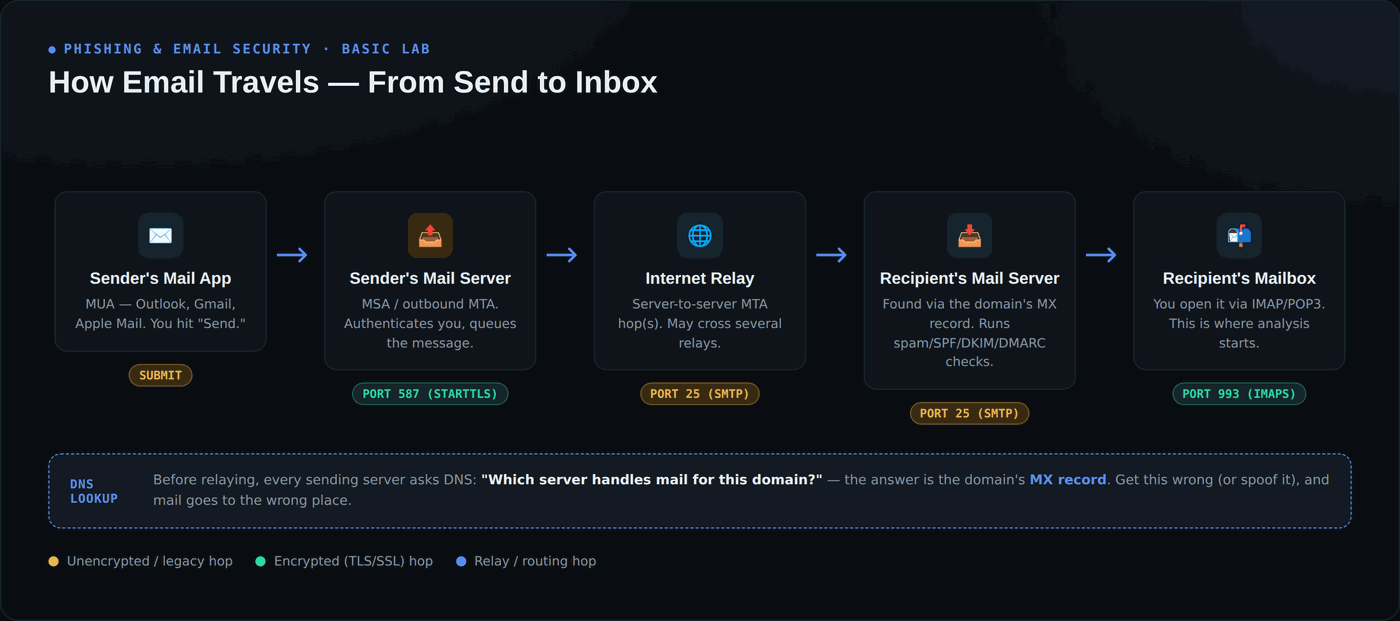
Your mail app (the MUA) hands the message to your provider's outbound server (the MSA/MTA), which looks up the recipient domain's MX record in DNS to find where to deliver it, then relays it — possibly through more than one server — until it lands on the recipient's mail server, which runs its own checks before final delivery.
02 · Foundations
Port Numbers You'll See in Headers
Every one of those hops happens over a specific port. Knowing them helps you read raw headers and server logs without guessing.
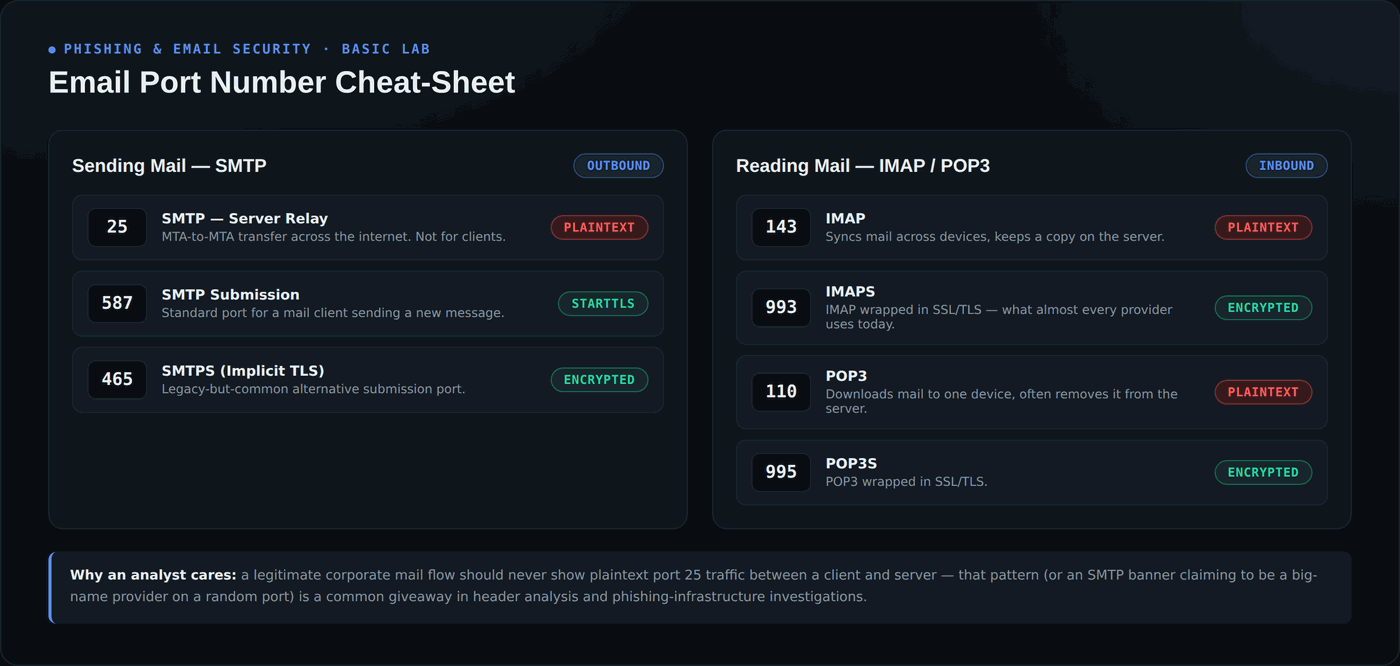
Sending uses SMTP (25 for server-to-server relay, 587/465 for a client submitting mail). Reading mail uses IMAP (143/993) or POP3 (110/995). The encrypted variants — 587, 465, 993, 995 — are what legitimate modern mail flows should use; plaintext ports showing up between a client and server is itself a red flag worth investigating.
03 · Foundations
Email Authentication Records
This is the part that actually catches spoofed senders. Three DNS TXT records, checked automatically by every major mail provider, decide whether a message is trustworthy.
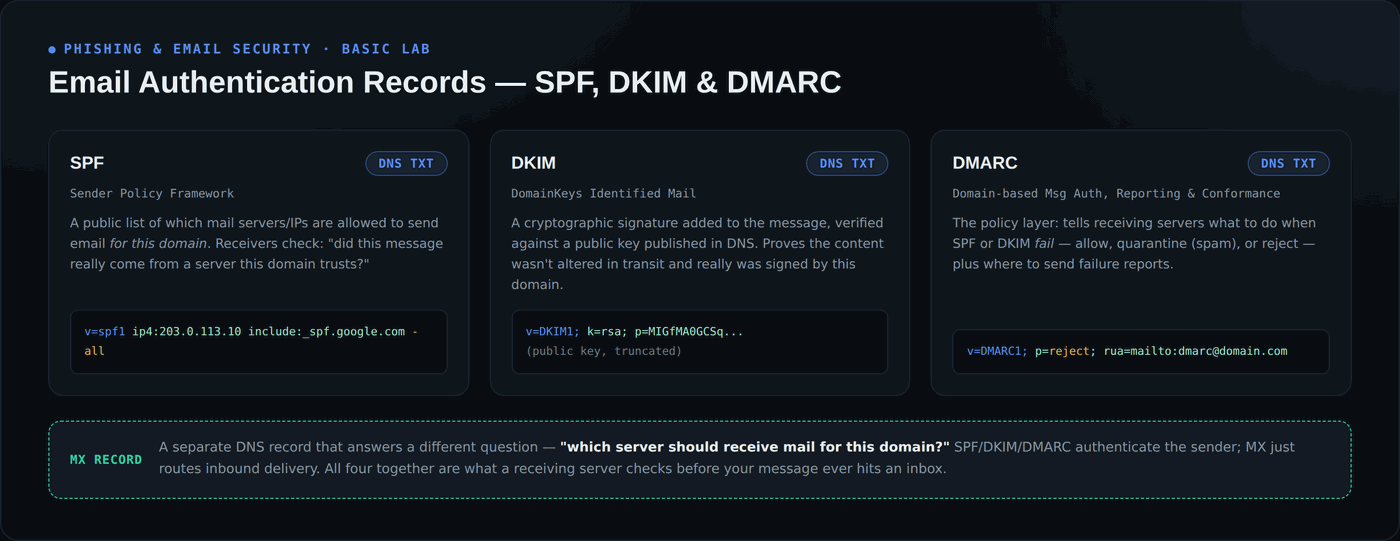
SPF lists which servers may send for a domain. DKIM cryptographically signs the message so it can't be altered in transit. DMARC is the policy: what to do (allow, quarantine, or reject) when SPF or DKIM fail. When you analyze a suspicious email, these three results — pass, fail, or none — are the single strongest signal you have.
04 · Foundations
How Mail Servers Work — The Relay Chain
Every server that touches a message stamps a Received: header on top of the previous ones — which means the header trail reads in reverse.
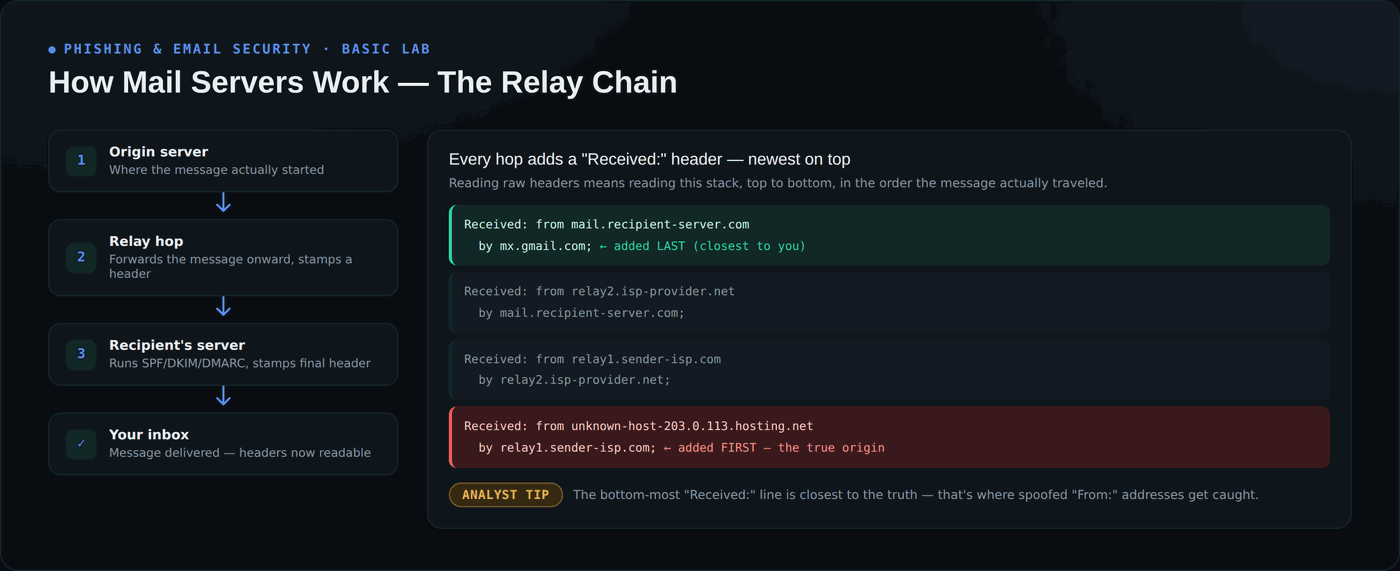
The newest Received header is at the top (closest to you); the oldest — added first — is at the bottom, and it's the closest thing to ground truth about where a message actually originated. This is exactly what you'll use in the hands-on section below.
Hands-On: Analyze a Real Phishing Email
Below is a sanitized, fictional phishing email — safe to study, nothing here is a live sender or a working link. Flip the toggle to switch between the raw headers as they'd actually appear, and an annotated breakdown of every red flag.
We detected unusual sign-in activity on your account from a new device. If you did not authorize this, verify your identity immediately or your account will be suspended within 24 hours.
Verify My Account →
Actual destination: meridianbank-secure-alerts.com/verify?id=88213&reset=1
From: "Meridian Trust Bank Security" <security@meridianbank-secure-alerts.com>
Reply-To: account-support@mail-recovery-service.example.ru
To: r.employee@example.com
Subject: URGENT: Unusual Sign-in Detected — Verify Your Account Now
Date: Wed, 26 Aug 2026 03:14:22 +0000
Message-ID: <8f2e1a9c-warn@meridianbank-secure-alerts.com>
Received: from mail.example.com (mail.example.com [192.0.2.5])
        by mx.examplecorp.com; Wed, 26 Aug 2026 03:14:41 +0000
Received: from relay9.freemail-relay.example.net (relay9.freemail-relay.example.net [203.0.113.44])
        by mail.example.com; Wed, 26 Aug 2026 03:14:38 +0000
Received: from unknown-host-198-51-100-77.cheap-hosting.example.net (198.51.100.77)
        by relay9.freemail-relay.example.net; Wed, 26 Aug 2026 03:14:29 +0000
Authentication-Results: mx.examplecorp.com;
    spf=fail (198.51.100.77 is not authorized to send for meridianbank.com) smtp.mailfrom=meridianbank-secure-alerts.com;
    dkim=none (message not signed);
    dmarc=fail (p=REJECT sp=REJECT dis=none) header.from=meridianbank-secure-alerts.com
meridianbank-secure-alerts.com — not the bank's real domain. This is the single fastest check you can do.Received: chain bottom-to-top, the message actually originated from a generic hosting provider IP — nothing tied to a bank's real infrastructure.spf=fail, dkim=none, dmarc=fail — the message fails SPF, has no DKIM signature at all, and fails DMARC with the domain's own reject policy. This alone is enough to quarantine it.Why This Matters
How to Detect & Protect
- Check the actual sending domain, not just the display name — a professional-looking "From" name means nothing if the domain behind it is wrong.
- Read the Authentication-Results header (or run your own SPF/DKIM/DMARC lookup) before trusting any message that asks for credentials, payment, or urgent action.
- Hover over every link before clicking and compare the visible text to the real destination — watch for extra words, hyphens, or the wrong domain/TLD entirely.
- Treat urgency and threats as a red flag, not a reason to move faster — "act within 24 hours" is a pressure tactic, not a legitimate deadline.
- Check Reply-To separately from From — a mismatch between the two is one of the easiest and most reliable phishing tells.
- Report through your organization's phishing-report button instead of forwarding or replying — it preserves the original headers so your SOC can actually investigate.