Header Forensics & Spoofing
The Basic lab taught you to check SPF/DKIM/DMARC as pass-or-fail. That's not the whole story. This lab covers the five real ways a sender gets spoofed, why a raw "pass" can still mean nothing without alignment, and then puts three realistic cases in front of you — including one that looks wrong but is completely legitimate.
01 · Foundations
Five Ways a Sender Gets Spoofed
"Spoofed" isn't one technique — it's a family of them, and each leaves different evidence. Knowing which one you're looking at tells you where to check.
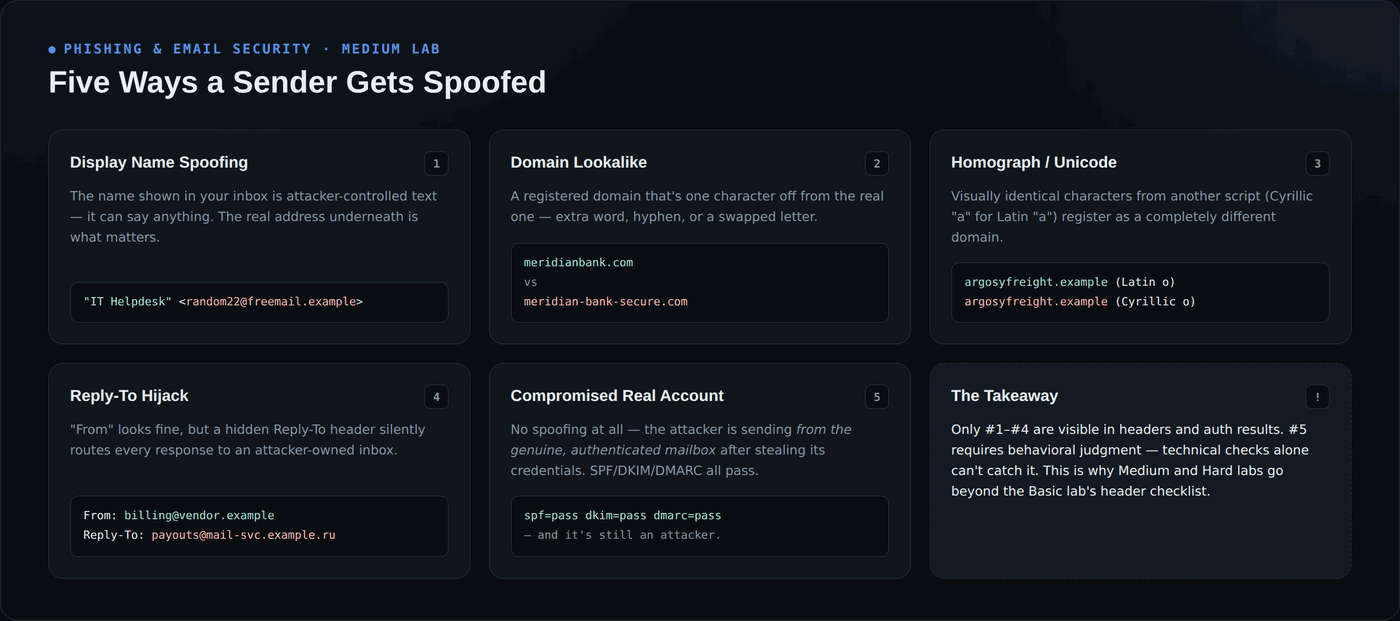
The first four are visible in headers and DNS records — a lookalike domain, a mismatched Reply-To, a homograph character. The fifth, a genuinely compromised mailbox, passes every technical check because it really is that account. That's the case this lab spends the most time on, because it's the one a header checklist alone can't catch.
02 · Foundations
Why "SPF Pass" Isn't the Same as "Safe"
SPF and DKIM can each independently pass without proving anything about the address a human actually reads in their inbox. DMARC closes that gap with alignment — but only if you know to check it.
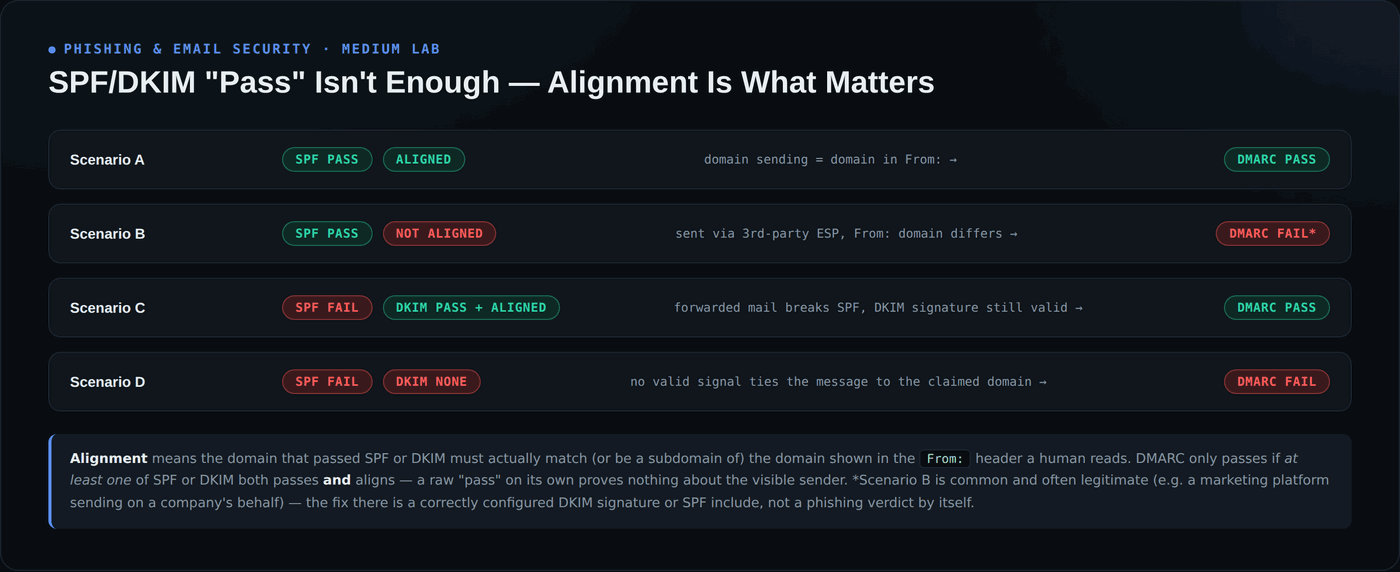
An unaligned SPF pass (Scenario B) is normal for legitimate marketing platforms and invoicing tools sending on a company's behalf — it is not automatically a red flag. The real danger is the opposite mistake: treating any SPF/DKIM pass as proof of safety without checking whether it's actually tied to the domain in front of you.
Hands-On: Three Cases, Three Different Answers
All three emails below are sanitized and fictional — safe to study, no live senders or working links. For each one: read the headers, form your own call, then reveal the analyst verdict to check yourself.
Case 1 of 3
The Vendor Payment Update
View Updated Bank Details →
From: "Argosy Freight — Accounts" <ap@argosyfreight-billing.com>
To: procurement@example.com
Subject: Updated Remittance Details — Please Confirm Receipt
Date: Mon, 10 Aug 2026 09:02:11 +0000
Message-ID: <a41ce-remit@argosyfreight-billing.com>
Received: from mail-relay-77.cheaphost.example.net (198.51.100.201)
        by mx.examplecorp.com; Mon, 10 Aug 2026 09:02:34 +0000
Authentication-Results: mx.examplecorp.com;
    spf=fail (198.51.100.201 is not authorized to send for argosyfreight.example) smtp.mailfrom=argosyfreight-billing.com;
    dkim=none (message not signed);
    dmarc=fail (p=REJECT) header.from=argosyfreight-billing.com
argosyfreight.example — this message comes from argosyfreight-billing.com, a similar but entirely separate registration.spf=fail, dkim=none, dmarc=fail — there's no legitimate-third-party-sender explanation here, because the domain itself isn't Argosy's.Reveal Analyst Verdict
This is the straightforward case: a lookalike domain that fails every authentication check. This is the pattern the Basic lab's checklist is built to catch. Case 2 is where it gets harder.
Case 2 of 3
The Reply on an Existing Thread
New Bank Details (PDF) →
From: "Priya Raman — Argosy Freight" <priya.raman@argosyfreight.example>
To: ap@example.com
Subject: Re: Invoice #4471 — please use our new bank details
Date: Fri, 14 Aug 2026 22:47:03 +0000
Message-ID: <9c2f-thread@argosyfreight.example>
References: <4471-orig@argosyfreight.example>
Received: from mail.argosyfreight.example (mail.argosyfreight.example [203.0.113.90])
        by mx.examplecorp.com; Fri, 14 Aug 2026 22:47:19 +0000
Authentication-Results: mx.examplecorp.com;
    spf=pass smtp.mailfrom=argosyfreight.example;
    dkim=pass header.d=argosyfreight.example;
    dmarc=pass (p=REJECT) header.from=argosyfreight.example
argosyfreight.example, the vendor's actual, previously-trusted domain.Reveal Analyst Verdict
Passing every header check is exactly what you'd expect from a hijacked real mailbox — technical authentication was never designed to catch this. The tell here is entirely behavioral: an unscheduled bank-detail change, requested only over email, with urgency attached. This is the scenario the Hard lab investigates end-to-end, including how the account was likely compromised in the first place.
Case 3 of 3
The Automated Invoice Notice
View Invoice on Quickledger →
From: "Quickledger Invoicing" <notifications@mail.quickledger-app.example>
To: ap@example.com
Subject: New invoice available from Argosy Freight — INV-4471
Date: Tue, 11 Aug 2026 14:20:55 +0000
Message-ID: <inv-4471-notice@mail.quickledger-app.example>
Received: from mta7.quickledger-app.example (mta7.quickledger-app.example [192.0.2.140])
        by mx.examplecorp.com; Tue, 11 Aug 2026 14:21:03 +0000
Authentication-Results: mx.examplecorp.com;
    spf=fail (192.0.2.140 is not authorized to send for argosyfreight.example) smtp.mailfrom=mail.quickledger-app.example;
    dkim=pass header.d=quickledger-app.example;
    dmarc=pass (p=QUARANTINE) header.from=quickledger-app.example
argosyfreight.example — the visible From: domain is quickledger-app.example, an invoicing platform, and that's the domain that matters.header.d=quickledger-app.example matches header.from=quickledger-app.example exactly — this is Scenario C from the alignment diagram above.Reveal Analyst Verdict
If you flagged this one as suspicious because of the SPF failure alone, that's exactly the false-positive trap this lab is designed to surface — an unaligned SPF result on a third-party platform's own domain is expected, not evidence of spoofing. Always check what domain the message is actually claiming to represent before judging the auth result.
Why This Matters
How to Detect & Protect
- Check alignment, not just pass/fail — confirm the domain that passed SPF or DKIM is actually the same domain shown in the From: header before trusting the result.
- An SPF fail from a known third-party platform isn't automatically malicious — check whether DKIM aligns to the sender's own domain before flagging.
- Never trust a bank-detail or payment change sent only by email, even from a real, previously-trusted, fully-authenticated address — verify by phone using a number you already had on file, not one in the message.
- Watch for timing and tone shifts on an existing thread — an unusual send time, uncharacteristic urgency, or a request that breaks from normal process are stronger signals than headers once an account is genuinely compromised.
- Treat "the domain is real" as the start of the analysis, not the end — a compromised legitimate account is the one case authentication alone cannot catch.